Blake Munroe
Moderators
-
Joined
-
Last visited
Everything posted by Blake Munroe
-
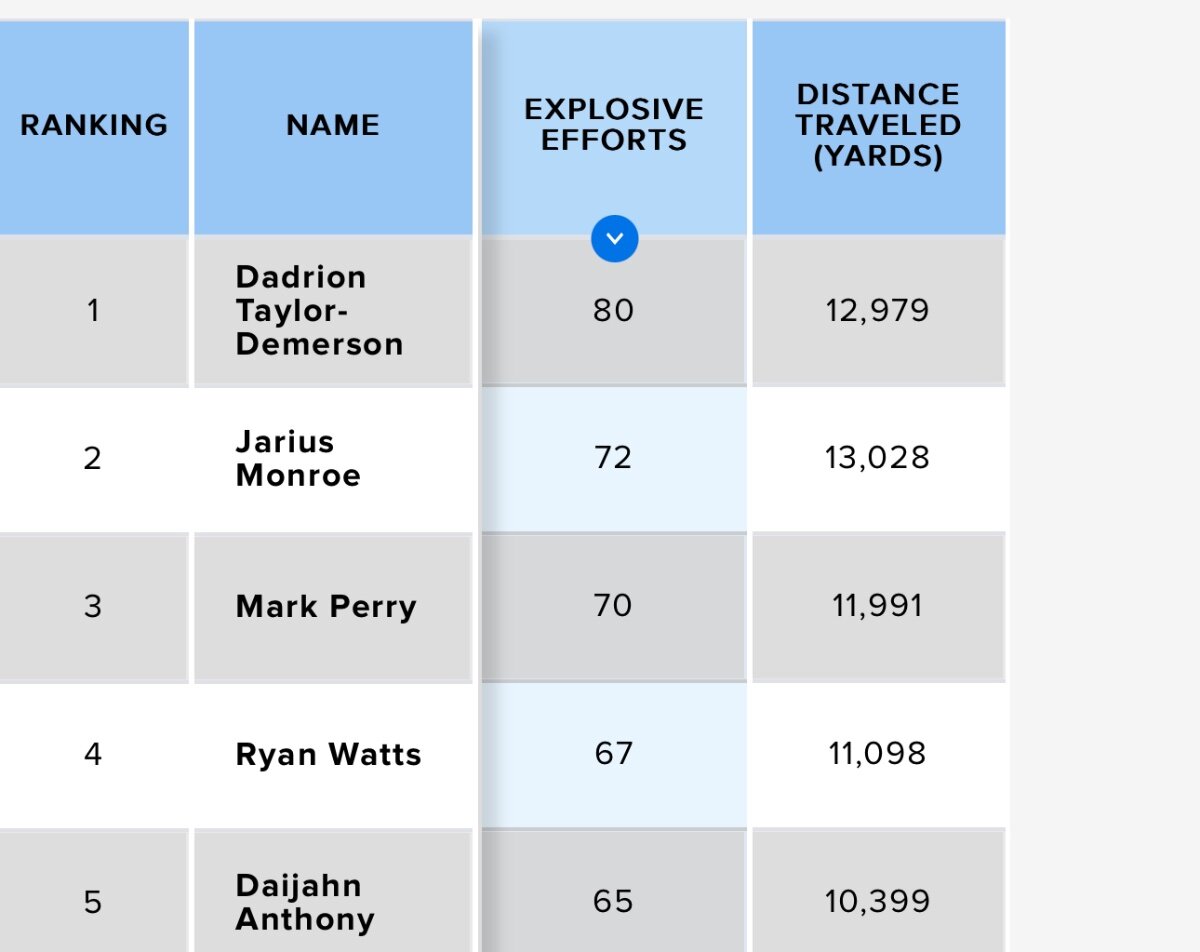
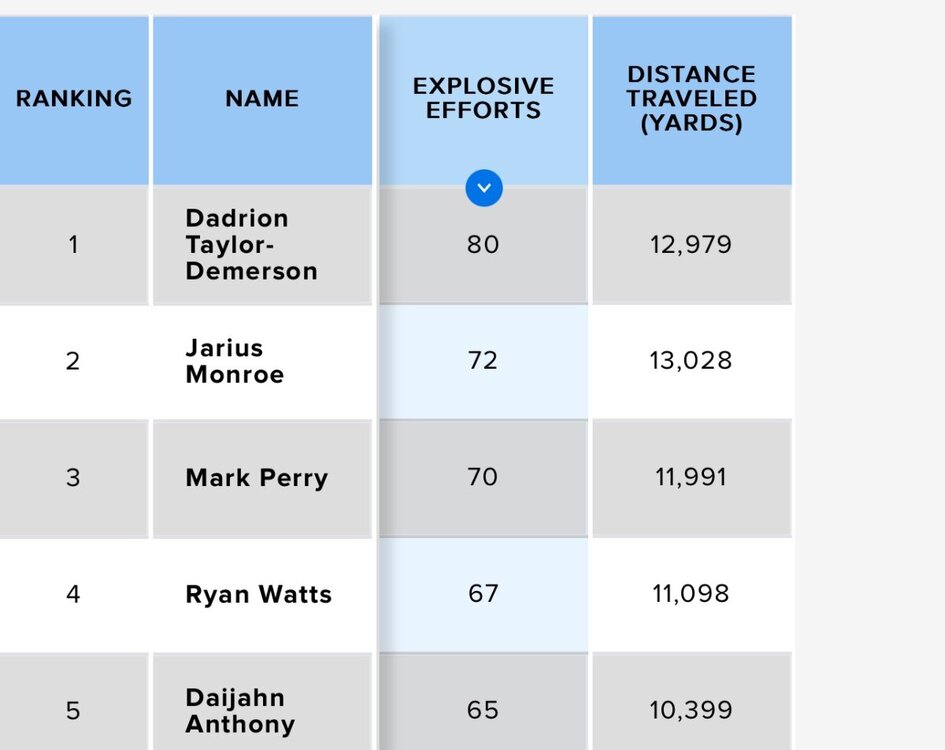
Most definitely. I think it says a lot about him, to your point about moving to safety. I’m with Rod on this one. I also have data on Christian Jones and T’Vondre Sweat (Zebra hooked me up!), so I’ll make a separate post today about them. I haven’t got to do a deeper dive into the Senior Bowl analytics yet like I did with the Shrine Bowl.I’ll take it one step further. Watts was also Top 5 in explosive efforts. Zebra defines an “explosive effort” as: Count of “high” accelerations and “high” decelerations a player achieves in a practice/game. A “high acceleration/deceleration is achieved when a player reaches at least ±3.5 YD/S².
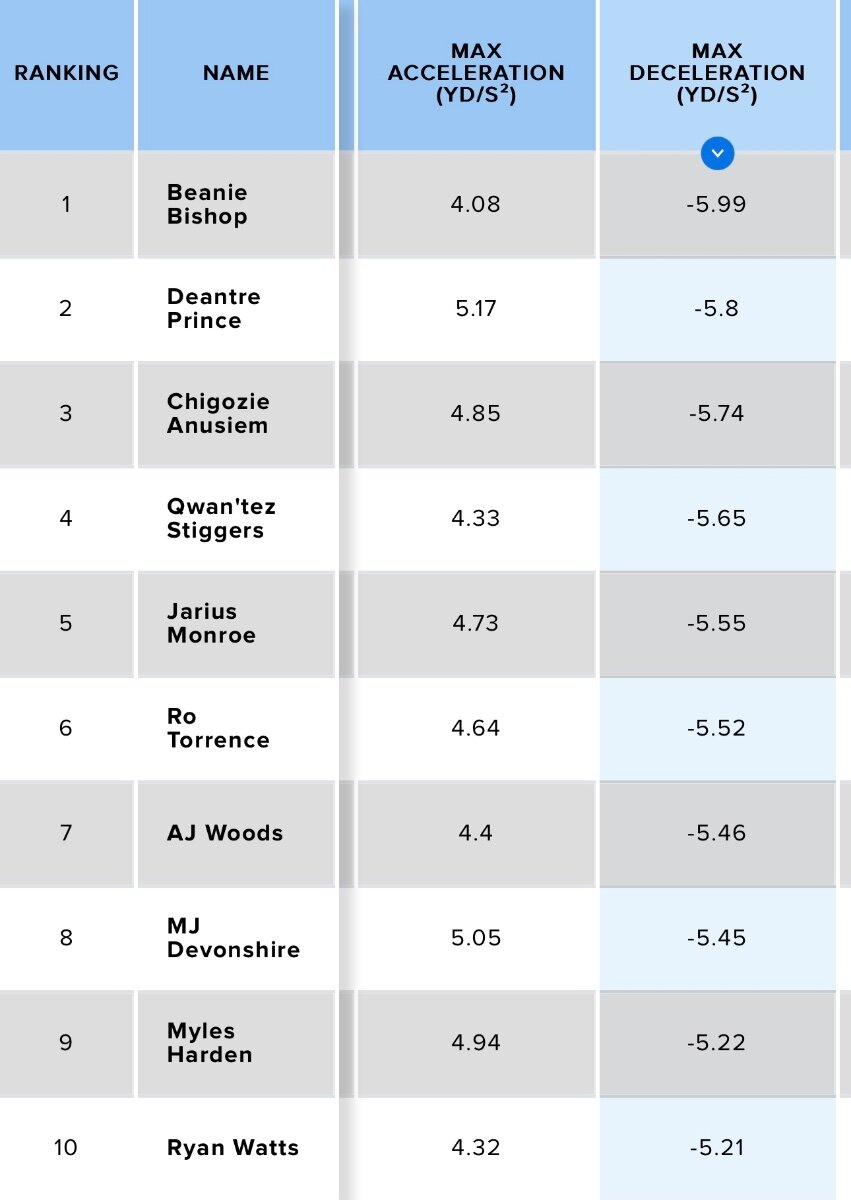
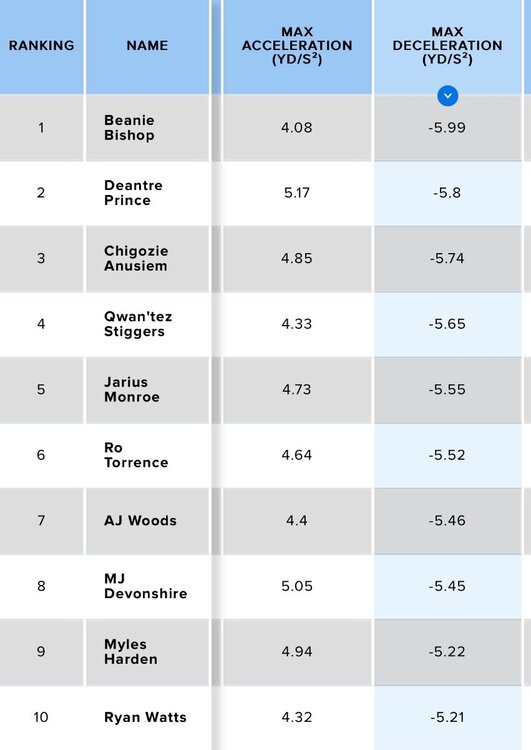
 Watts is actually Top 10 in deceleration. Here’s the list of Shrine Bowl DBs with the fastest deceleration speed: So he is very quick at stopping and changing direction.
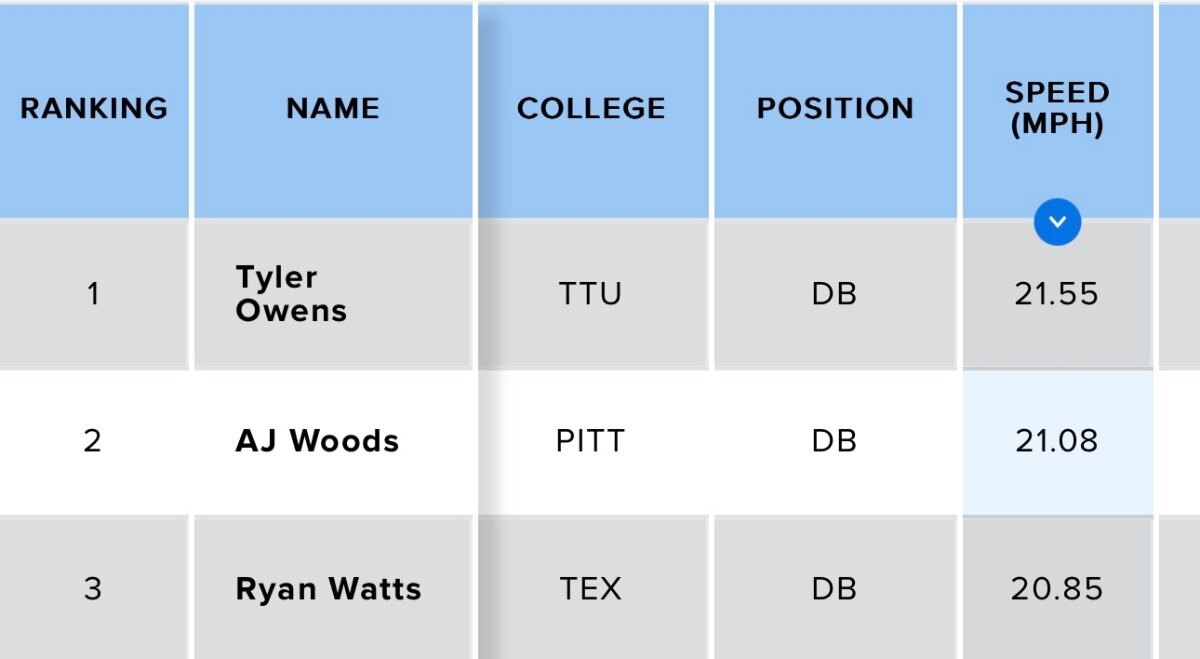
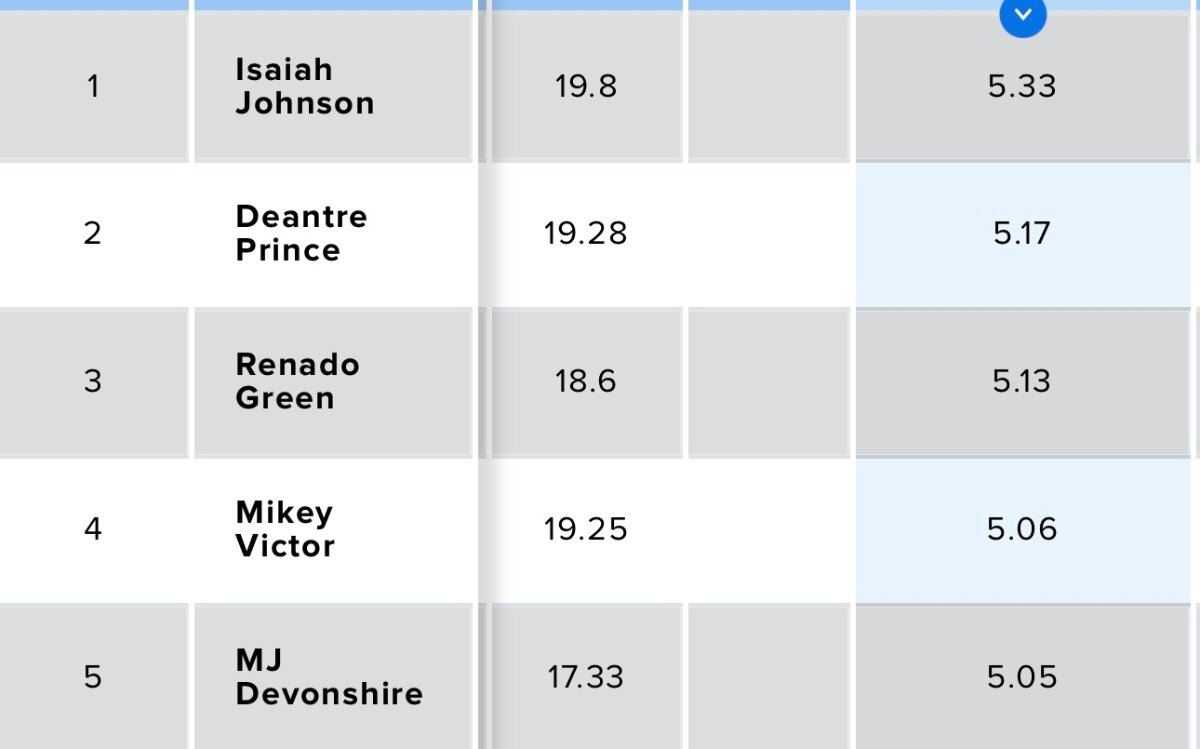
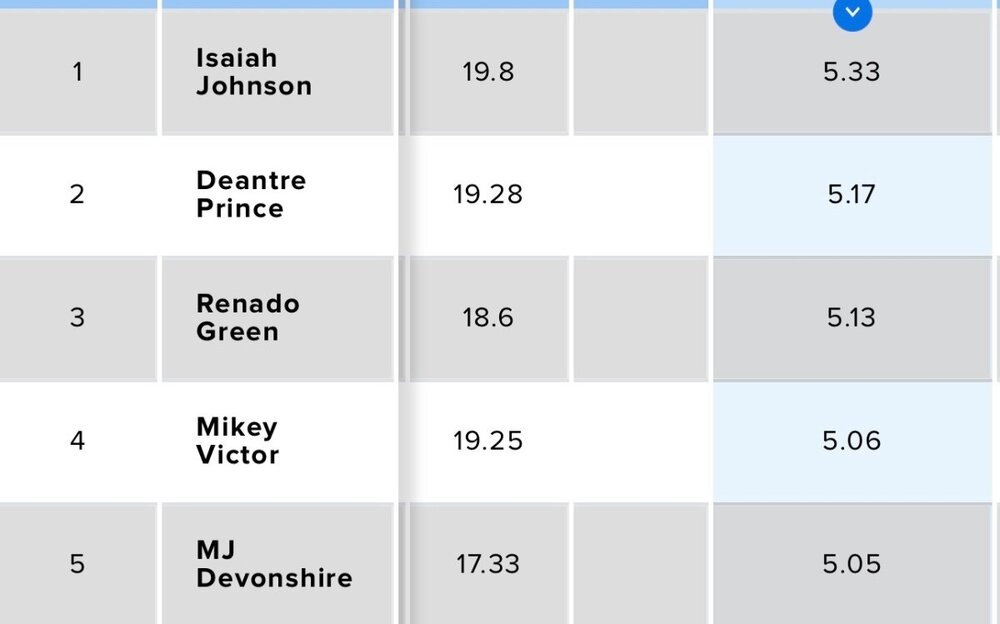
 Bobby responded faster than I did, but there’s the numbers behind what I was telling Bobby about yesterday. Watts definitely has quicker deceleration, however. I’ll address that in the next post below.So I actually dug into this yesterday. Here’s the three fastest players from the Shrine Bowl: 1. Tyler Owens 2. AJ Woods 3. Ryan Watts You can see their times here: However, now let’s look at max acceleration times. Zebra Sports (who gave me all this data) defines Maximum acceleration as: yards per second per second (YD/S²) a player achieves during a practice/game. This stat can indicate players that are able to start/stop quickly and change direction. The higher the number, the better. Here’s the top five from just DBs: And here is Ryan Watts: So, as you can see, he’s 27th in acceleration. While he has pretty good top end speed it’s just taking forever to get there.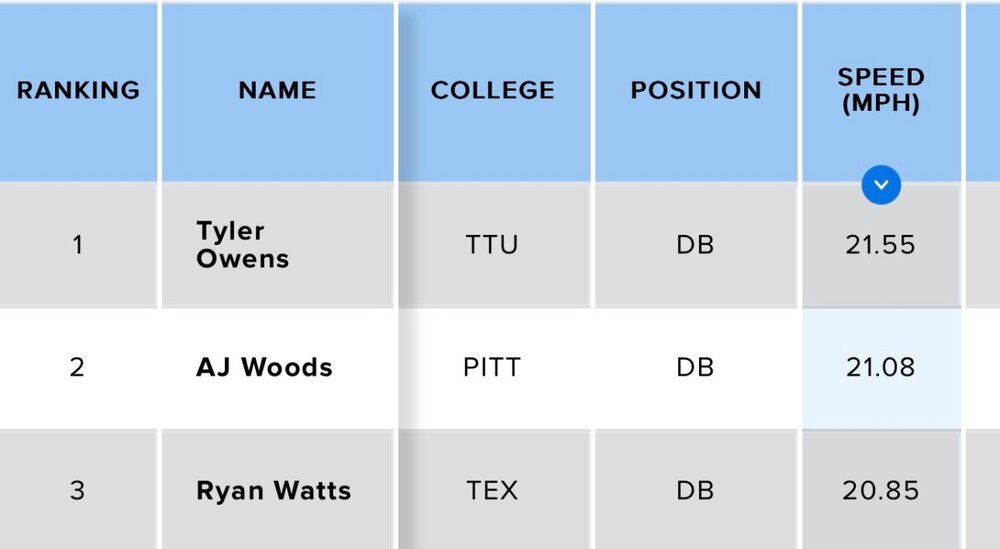
 Good stuff, Bobby. Yesterday’s news was huge for a number of reasons. It’s going to be interesting to follow and see how it all unfolds in the end.Also worth mentioning he was a linebacker at San Diego State University.Junior year highlights: http://www.hudl.com/video/3/19343775/64e8d4f84deb260bc08b141aThe Longhorns offered Aldine Nimitz linebacker Javar Thomas today. Earlier this afternoon, Texas assistant coach Jeff Banks stopped by the school to meet with Thomas and it was then that an offer was extended. The 6-3, 195-pound linebacker is currently ranked a three-star prospect by both On3 and 247Sports. Thomas also holds offers from Washington, SMU, Houston, UTSA, Baylor, TCU and Texas State.The Longhorns offered Aldine Nimitz linebacker Javar Thomas today. Earlier this afternoon, Texas assistant coach Jeff Banks stopped by the school to meet with Thomas and it was then that an offer was extended. The 6-3, 195-pound linebacker is currently ranked a three-star prospect by both On3 and 247Sports. Thomas also holds offers from Washington, SMU, Houston, UTSA, Baylor, TCU and Texas State. View full newsThis is freakin awesome. I love it. Thank you for posting.Not Texas related, but RIP to a legend.
Important Information
We have placed cookies on your device to help make this website better. You can adjust your cookie settings, otherwise we'll assume you're okay to continue.
Account
Navigation
Search
Configure browser push notifications
Chrome (Android)
- Tap the lock icon next to the address bar.
- Tap Permissions → Notifications.
- Adjust your preference.
Chrome (Desktop)
- Click the padlock icon in the address bar.
- Select Site settings.
- Find Notifications and adjust your preference.
Safari (iOS 16.4+)
- Ensure the site is installed via Add to Home Screen.
- Open Settings App → Notifications.
- Find your app name and adjust your preference.
Safari (macOS)
- Go to Safari → Preferences.
- Click the Websites tab.
- Select Notifications in the sidebar.
- Find this website and adjust your preference.
Edge (Android)
- Tap the lock icon next to the address bar.
- Tap Permissions.
- Find Notifications and adjust your preference.
Edge (Desktop)
- Click the padlock icon in the address bar.
- Click Permissions for this site.
- Find Notifications and adjust your preference.
Firefox (Android)
- Go to Settings → Site permissions.
- Tap Notifications.
- Find this site in the list and adjust your preference.
Firefox (Desktop)
- Open Firefox Settings.
- Search for Notifications.
- Find this site in the list and adjust your preference.