Blake Munroe
Moderators
-
Joined
-
Last visited
Everything posted by Blake Munroe
-
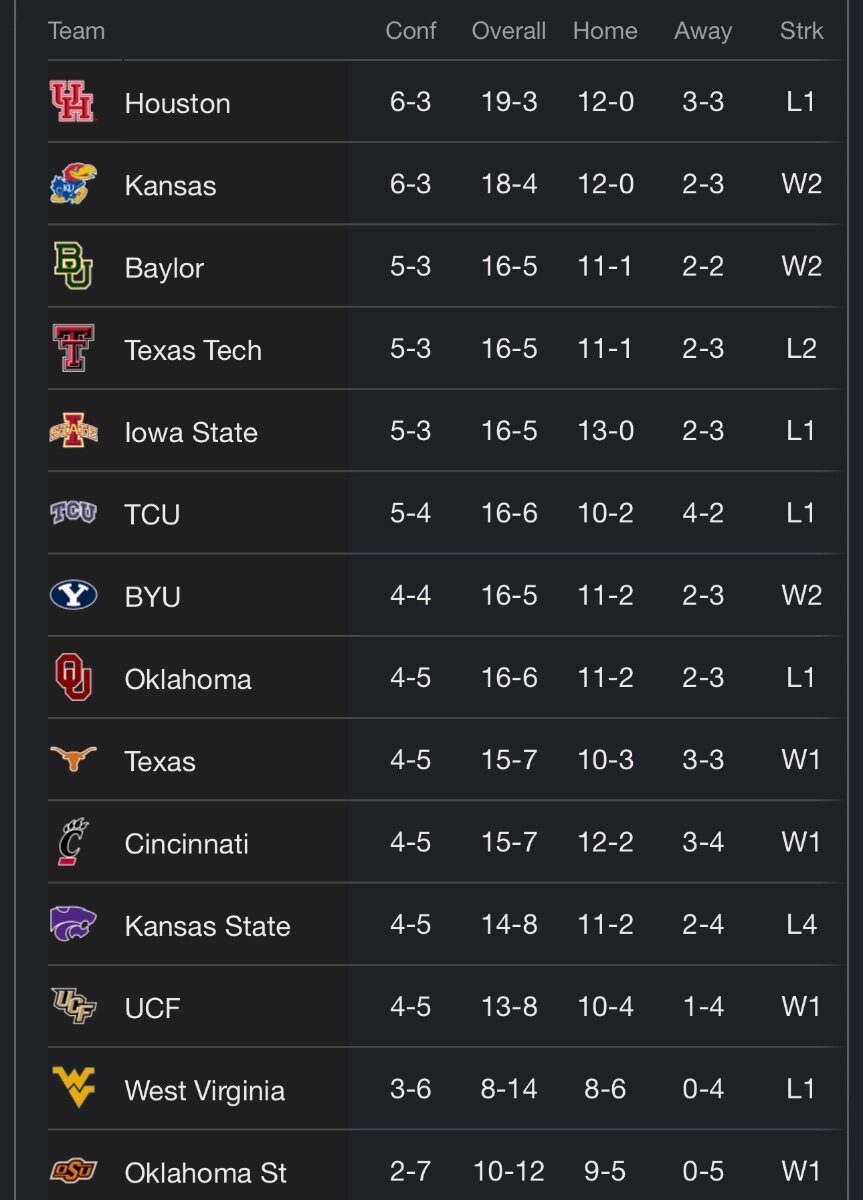
Good morning!Kick off your Monday morning with some Coffee and Football over on the On Texas Football YouTube Channel. At 8 AM, join me, along with Bobby Burton and Gerry Hamilton, as we discuss the latest Longhorns news, plus recruiting, portal talk and much more. And today I would like to thank Longhorn Wealth Management Group for sponsoring the show!Kick off your Monday morning with some Coffee and Football over on the On Texas Football YouTube Channel. At 8 AM, join me, along with Bobby Burton and Gerry Hamilton, as we discuss the latest Longhorns news, plus recruiting, portal talk and much more. And today I would like to thank Longhorn Wealth Management Group for sponsoring the show! View full newsChux Speed. Sports performance movement coach. more info:And they are SICK. I need a pair of these.Looks like Barstool got DMCA’d. Here’s a new linkGreat stuff, @CJ Vogel . That’s insane on the gain that Simmons has made.Big 12 ate each other up yesterday. #25 TCU, #23 Oklahoma, #15 Texas Tech, #12 Iowa State and #4 Houston all lost.
Important Information
We have placed cookies on your device to help make this website better. You can adjust your cookie settings, otherwise we'll assume you're okay to continue.
Account
Navigation
Search
Configure browser push notifications
Chrome (Android)
- Tap the lock icon next to the address bar.
- Tap Permissions → Notifications.
- Adjust your preference.
Chrome (Desktop)
- Click the padlock icon in the address bar.
- Select Site settings.
- Find Notifications and adjust your preference.
Safari (iOS 16.4+)
- Ensure the site is installed via Add to Home Screen.
- Open Settings App → Notifications.
- Find your app name and adjust your preference.
Safari (macOS)
- Go to Safari → Preferences.
- Click the Websites tab.
- Select Notifications in the sidebar.
- Find this website and adjust your preference.
Edge (Android)
- Tap the lock icon next to the address bar.
- Tap Permissions.
- Find Notifications and adjust your preference.
Edge (Desktop)
- Click the padlock icon in the address bar.
- Click Permissions for this site.
- Find Notifications and adjust your preference.
Firefox (Android)
- Go to Settings → Site permissions.
- Tap Notifications.
- Find this site in the list and adjust your preference.
Firefox (Desktop)
- Open Firefox Settings.
- Search for Notifications.
- Find this site in the list and adjust your preference.